CS111 Lab 6b:
Recursion with Inheritance and Interfaces
Exercise: Fractal C-curve.
|
Use the MyMain() code below to test your application.
Classes needed for this app: Fractal.java, FractalCanvas.java, AppWindow.java, and MyMain.java.
|
Part I: Graphical User Interface
|
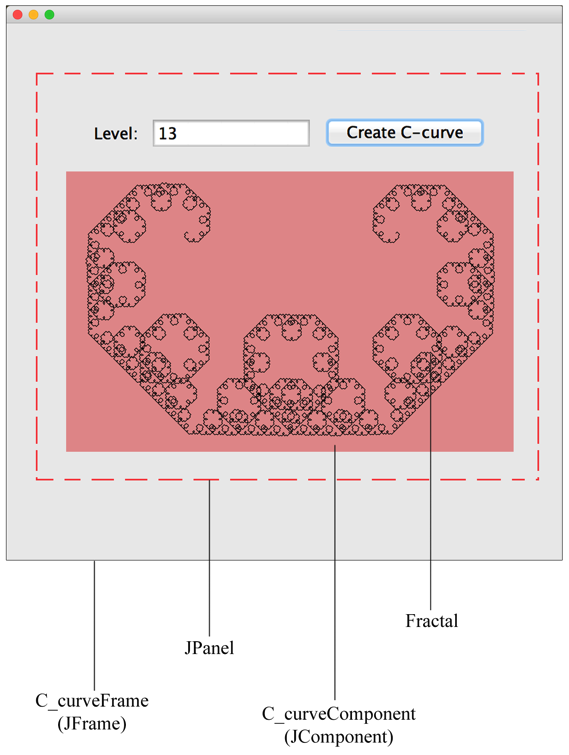
This application will contain a graphical window as the top-level container.
It will measure 700 pixels in height and width.
The user interface components placed on this top-level container will include:
- JPanel container: This is lightweight container for components.
For example, a button
and a label component can be placed into a panel component.
- JLabel: Label for the input textfield component.
- JTextField: Input textbox for the user to specify a C-curve level.
Note: For numeric input, this string must parsed into a number value.
- JButton : To activate the drawing of a C-curve fractal.
Note: This button will be assigned an ActionListener.
- JComponent container: The drawing canvas for the C-curve fractal.
Note: JComponent includes an infrastructure for painting.
|
Fractal.java
Complete this code.
import java.awt.Graphics;

public class Fractal {

	public void drawCCurve(Graphics g, int x1, int y1, int x2, int y2, int level) {

		// BASE CASE


		// RECURSIVE COMPONENT


	}

}
FractalCanvas.java
import java.awt.Graphics;
import javax.swing.JComponent;

public class FractalCanvas extends JComponent {

	// DATA MEMBERS FOR CREATING A DRAWING

	private Fractal fractal;
	private int level;
	private int x1, y1, x2, y2;

	public FractalCanvas() {
		level = 2;
		fractal = new Fractal();
	}

	public void setXY(int x1, int y1, int x2, int y2) {
		this.x1 = x1;
		this.y1 = y1;
		this.x2 = x2;
		this.y2 = y2;
	}

	public void createCcurve(int level) {
		this.level = level;
		repaint();
	}

	public void paintComponent(Graphics g) {
		fractal.drawCCurve(g, x1, y1, x2, y2, level);
	}
}
AppWindow.java
import java.awt.Dimension;
import java.awt.event.ActionEvent;
import java.awt.event.ActionListener;

import javax.swing.JButton;
import javax.swing.JFrame;
import javax.swing.JLabel;
import javax.swing.JPanel;
import javax.swing.JTextField;

public class AppWindow extends JFrame {

	// TASK 1: SPECIFY DIMENSIONS FOR THE GRAPHICAL WINDOW FRAME
	// A GRAPHICAL APPLICATION SHOWS INFORMATION INSIDE A FRAME, WINDOW
	private static final int FRAME_WIDTH = 700;
	private static final int FRAME_HEIGHT = 700;
	private static final int DEFAULT_LEVEL = 2;

	// TASK 2: SPECIFY THE GUI ELEMENTS THAT WILL BE PLACED
	// IN THE WINDOW FRAME.
	private JLabel levelLabel;
	private JTextField levelField;
	private JButton button;
	private FractalCanvas cCurveDrawComponent;

	// DEFAULT CONSTRUCTOR
	public AppWindow() {

		// TASK 1: SET THE WIDTH AND HEIGHT OF THE WINDOW FRAME
		this.setSize(FRAME_WIDTH, FRAME_HEIGHT);

		// TASK 2: CREATE THE GUI ELEMENTS, INCLUDING THE DRAWING COMPONENT
		createTextField();
		createButton();
		cCurveDrawComponent = new FractalCanvas();
		cCurveDrawComponent.setPreferredSize(new Dimension(FRAME_WIDTH, FRAME_WIDTH));
		cCurveDrawComponent.createCcurve(DEFAULT_LEVEL);

		// TASK 3: CREATE A PANEL CONTAINER TO HOLD THE GUI ELEMENTS
		JPanel panel = new JPanel();

		// TASK 4: ADD EACH GUI ELEMENT TO THE PANEL
		panel.add(levelLabel);
		panel.add(levelField);
		panel.add(button);
		panel.add(cCurveDrawComponent);

		// TASK 5: ADD THE PANEL TO THE FRAME
		this.add(panel);
	}

	private void createTextField() {
		levelLabel = new JLabel("Level: ");
		final int FIELD_WIDTH = 10;
		levelField = new JTextField(FIELD_WIDTH);
		levelField.setText("" + DEFAULT_LEVEL);
	}

	private void createButton() {
		button = new JButton("Create C-curve");
		ActionListener listener = new FractalActionListener();
		button.addActionListener(listener);
	}

	class FractalActionListener implements ActionListener {
		public void actionPerformed(ActionEvent event) {
			// TASK 1: GET THE FRACTAL LEVEL
			int level = Integer.parseInt(levelField.getText());

			// TASK 2: GET THE WINDOW DIMENSIONS
			int x1 = FRAME_WIDTH / 4;
			int y1 = FRAME_HEIGHT / 3;
			int x2 = FRAME_WIDTH - x1;
			int y2 = y1;

			// TASK 3: SET THE XY START AND END FOR THE DRAWING COMPONENT
			cCurveDrawComponent.setXY(x1, y1, x2, y2);

			// TASK 4: CREATE THE CURVE ON THE DRAWING COMPONENT
			cCurveDrawComponent.createCcurve(level);
		}
	}
}
MyMain.java
import javax.swing.JFrame;

public class MyMain {

	public static void main(String[] args) {

		JFrame frame = new AppWindow();
		frame.setDefaultCloseOperation(JFrame.EXIT_ON_CLOSE);
		frame.setVisible(true);
	}
}